20 November 2026 · Telegram Ban Service · 9 min read
How to Delete a Telegram Channel, and What to Do If You Don't Own It
Here is how to delete a Telegram channel: only the creator can do it, using the channel's own Edit menu. Telegram's moderation team decides everything else. If you don't own the channel, you file a report instead, and a moderator judges whether it broke the Terms of Service or Community Guidelines before taking action.
Who can actually delete a Telegram channel?
Only the channel's creator holds that power. Telegram Ban Service is an independent content reporting and takedown service built on that fact: created it, deleting is a setting; didn't create it, the only lever left is a report to Telegram. We put that evidence together and point it at the right official address, whether that's the in-app Report button, @NoToScam or abuse@telegram.org. Telegram's own moderators make the call on a restriction or a ban, and nothing in that process can be bought. As of November 2026, Telegram's FAQ states no fixed deadline for a decision, so speed depends on the evidence filed.
That split explains much of the confusion behind this guide's own long-tails, since how to delete a Telegram channel means two different jobs depending on who is asking. Own the channel? Skip to the delete steps below. Don't own it? Skip to the reporting routes, because the owner's Edit menu never appears for a channel that isn't yours.
Which situation matches yours?
| Situation | What you can do | Where to go |
|---|---|---|
| Delete Telegram channel (you made it) | Edit > Delete Channel | Delete steps below |
| Remove Telegram channel you don't own | No delete option; report it instead | Report steps below |
| Deleted your account, not a channel | Channel survives, orphaned | Account section below |
Delete a channel on Telegram you own, step by step
Telegram Ban Service hears one question constantly: how do I delete a Telegram channel I created myself, without outside help? You don't need any; deleting takes under a minute through these screens:
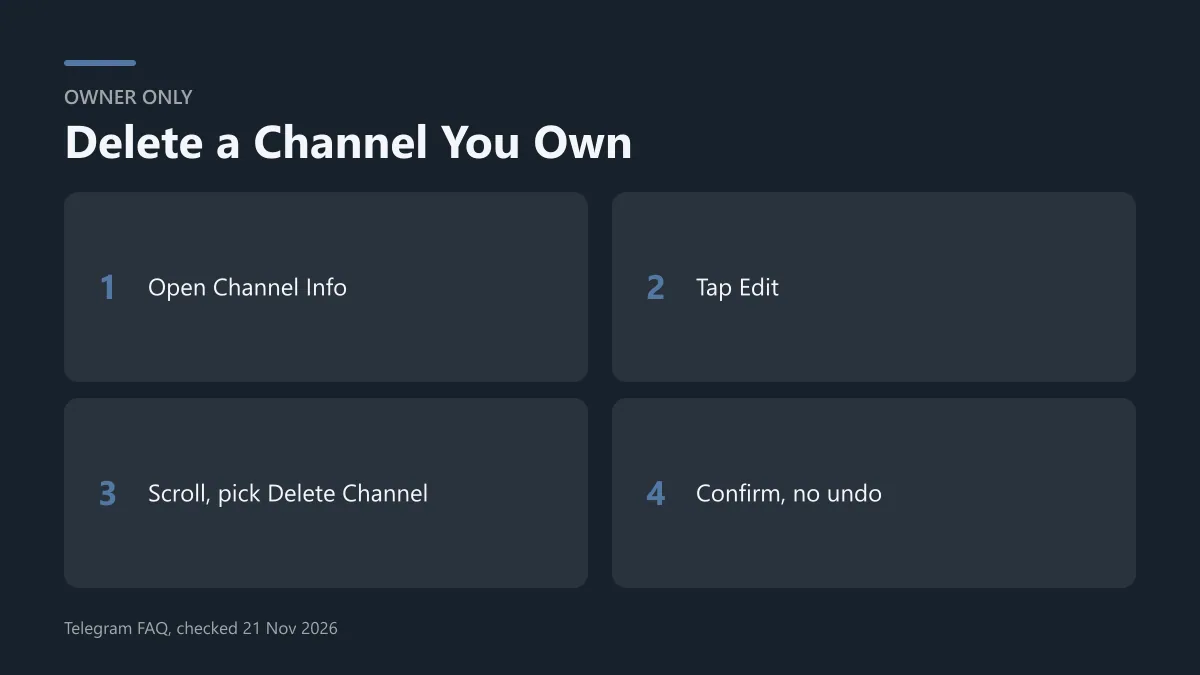
- Find the channel, then tap its title bar once to land on Channel Info.
- Tap Edit on mobile, or Manage Channel on desktop.
- Scroll to the bottom of that screen and select Delete Channel.
- Confirm the warning. Telegram removes the channel for every subscriber the moment you confirm.
There is no undo button, so this is genuinely how to permanently delete Telegram channel content once confirmed. Export any posts, files or member lists first, because the @username and t.me link both become free for anyone to claim once it's gone. Want out of running the channel rather than its destruction? Transfer ownership or just leave instead. Either option keeps the channel alive for its other subscribers, which full deletion never does.
Does deleting your Telegram account also delete your channels?
No. Telegram's own FAQ on account deactivation explains that closing your account wipes your messages and contacts. A channel or group you created is orphaned, not deleted: it keeps running, its other admins keep their rights, the content stays put. So if someone tells you to "delete your account" to delete a channel on Telegram, that advice is backwards. It removes you from the picture while the channel keeps running for everyone still in it.
Do the two actions separately, in the right order. Delete the channel first, through its own Edit menu, while your account can still reach that setting. Close the account afterward, once every channel you wanted gone is already gone. A deleted account has no settings left, and Telegram support will not reopen one to clean up a forgotten channel.
How to report a channel, group, bot or message you don't own
Reporting starts the same way everywhere: open the thing breaking a rule, find Report, choose the reason that fits.
| What you're reporting | Where to tap | Typical reason |
|---|---|---|
| A public channel | Channel name > the three-dot menu > Report | Scam, impersonation, illegal goods |
| A group | Group name > Report, or hold a message > Report | Spam, mass-adds, harassment |
| A bot or user | Open their profile > Report, or hold their message | Phishing bot, fake account |
| One message | Press and hold that message > Report | The single post breaking a rule |
A recurring question: leave a channel first, before reporting it? No. Reporting needs no membership; anyone who sees a public channel can report it. Deleting happens from inside its own settings, and leaving first only drops your admin rights.
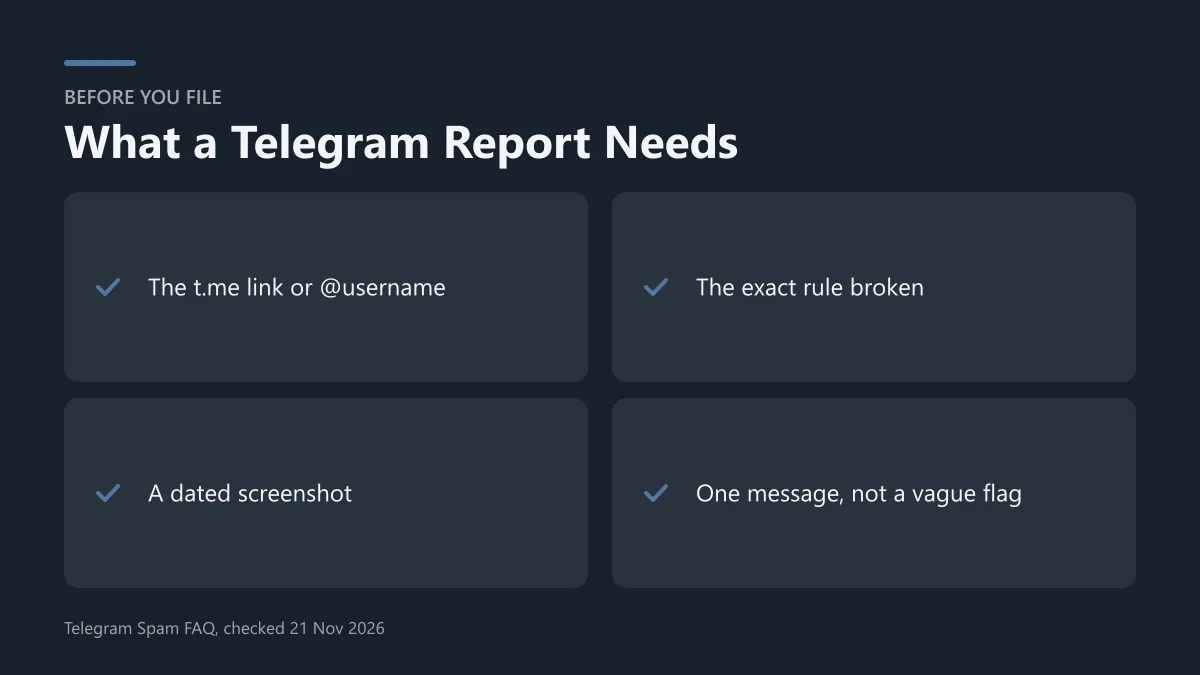
Pointing a moderator at one exact message beats flagging a whole channel with no specifics. For a scamming account, use the in-app Report button, then message Telegram's official @NoToScam channel with the @username and proof. For illegal public material, email abuse@telegram.org with a dated screenshot and the exact t.me link.
What happens after you report, and where it stops working
Telegram sets no published timeline. A badly documented report can sit for weeks; a screenshot, a date and a named rule can get a channel gone within days. The one constant: a human reviewer decides, never the reporter. Telegram's Spam FAQ states a limit, too: private chats between their own participants are never processed on request, so a direct message has no report path at all, only block.
That line also protects lawful speech. Telegram's FAQ says the platform won't act against someone for peacefully expressing an unpopular opinion, so a report built on "I just don't like this channel" goes nowhere.
What won't get a channel banned?
A mass report Telegram bot sells a simple idea: fire hundreds of identical complaints and the target goes offline. That isn't how review works. Telegram's systems spot a burst of copy-pasted reports from linked accounts and discount the batch; the reporting accounts can end up limited for the pattern. One well-documented report outperforms a hundred generic ones.
Telegram Ban Service declines cases the way we'd want a stranger to decline ours. No fake or duplicate reports, no coordinated pile-ons, no filing against a competitor rather than a genuine rule-breaker. A case we take on names the exact rule broken and the proof behind it.
Reporting problems beyond Telegram channels
Telegram Ban Service handles this same reporting work off Telegram, too, since the myths and evidence rules repeat platform to platform. A seller's WhatsApp mass-report bot pitch gets checked against WhatsApp's own rules the same way, and the volume myth shows up again in what an Instagram mass-report service buyer actually gets. Our WhatsApp ban service breakdown covers what's hireable for a WhatsApp target, and our Facebook post removal walkthrough does the same through Meta.
Not every removal problem is platform-enforcement. A bad review needs a different playbook, our repair playbook for the ask-flag-outweigh approach, plus a Healthgrades listing and an Airbnb review as a guest.
Not sure which path fits? Browse our reporting and takedown guides or send the channel link and the rule it's breaking, and we'll say if Telegram bans for it.
Sources
- Telegram FAQ — deactivation, report routes, public-vs-private limit
- Telegram Spam FAQ — reports reviewed by staff
- Telegram Moderation — rule removal
FAQ
How do I delete a Telegram channel I don't own?
No. The delete option only exists for the channel's creator, and it never appears in the menus of an admin, a moderator or a regular subscriber. If you don't own the channel, there is no setting that removes it, however many rules you can see it breaking. Your only real route is to report it to Telegram through the in-app Report button, naming the specific rule and attaching proof. A moderator then reviews the case and decides whether the channel gets restricted or banned. Changing your role, leaving and rejoining, or asking the creator for admin rights will not create a delete option. You cannot remove Telegram channel content you don't own that way, since deletion is tied to creation, not to any permission you can be granted. One exception worth knowing: if the creator's account itself gets closed, the channel does not vanish with it. It stays online, orphaned, until a remaining admin takes it over.
How to permanently delete Telegram channel content for good?
Tap the channel's title bar once to land on Channel Info, tap Edit (or Manage Channel on desktop), scroll down and choose Delete Channel, then confirm the warning. That confirmation is final: Telegram removes the channel for every subscriber at once, with no grace period and no way to undo it afterward. Export anything you want to keep, such as pinned posts, shared files or a member list, before you tap confirm, because none of it is recoverable once the deletion completes. The channel's public @username and its t.me link are both released once it's gone, meaning someone else, including an unrelated account, can claim that same handle later. This is the only way to delete a channel on Telegram; everyone else has to report the channel instead. Closing your whole account afterward is a separate step; it only removes your own messages and contacts while any other channel you created sits orphaned, untouched.
Can you recover a Telegram channel after deleting it?
No. Deletion is permanent on Telegram's side, and it wipes the channel for every subscriber the instant you confirm it, with nothing kept in reserve to restore later. The posts, the member list and the channel's history are all gone together, not archived somewhere you can request back. What does come back is the handle: the @username and the t.me link both become available again, so you, or anyone else, can register that same name on a fresh channel afterward. That new channel starts from zero, with none of the original subscribers or history attached. Export whatever you need before you confirm. Asking Telegram support to reverse a deletion afterward will not work, and Telegram's account-deletion FAQ confirms the same one-way behavior for whole accounts, too.
Does deleting my Telegram account delete my channels too?
No, and this is the mix-up behind a lot of searches for how to delete a Telegram channel. Closing your account through Telegram's deactivation page wipes your own messages and contacts. A channel or group you created is orphaned rather than removed: it keeps running for its subscribers, its remaining admins keep their existing rights, and none of its content disappears. If you actually want the channel gone, delete it first from its own Edit menu, while your account can still reach that setting. Close the account afterward if you still want to. Doing it in the opposite order leaves you with a channel you can no longer manage, since a deleted account has no settings left to open. Treat the account and the channel as two separate switches to flip in the right order.
Do I need to leave a channel before I can report it?
No. Reporting a public channel, group, bot or message needs no membership and no admin rights at all. Anyone who can see the content can report it from outside, while staying subscribed. The confusion comes from a different situation: deleting your own channel, which also needs no exit first, since the Delete Channel option sits inside the channel's own settings. Leaving early only costs you your admin rights and your view of what happens next, without removing the channel or group for anyone still in it. If you plan to report something and then step away, report first while you can still see the content to describe the rule it breaks. Once you leave, you lose the ability to screenshot new posts, so a report filed after the fact can carry less specific evidence.
Is there a deadline for Telegram to act on a report?
No. Telegram sets no deadline anywhere in its own documentation, and outcomes vary widely because of it. A channel reported with a dated screenshot and a named rule can be reviewed and actioned within days. A vague report with none of that can sit untouched for weeks or longer. Ignore any guide that quotes a precise turnaround in hours, since no Telegram policy page states one, and the figure is invented. What actually moves a case faster is specific, verifiable evidence, not urgency in how the report is worded or how many times it gets refiled. If a channel is still visible after a few days, that alone does not mean the report failed. It can just as easily mean review is still in progress, so refiling the identical report seldom changes much.
Does mass reporting a Telegram channel get it banned faster?
No, and it can backfire on the people doing it. Telegram's moderation reviews the rule-break itself, not how many complaints arrive about it. Its systems are built to notice a sudden spike of identical reports coming from linked accounts, discounting the whole burst rather than weighing it. Accounts caught coordinating false or duplicate reports risk limits of their own, which turns a mass-report attempt into a liability for the reporters rather than a shortcut. A single, well-documented report naming the exact rule and showing dated proof outperforms a hundred copy-pasted ones, because evidence is what a human moderator actually reviews. Treat any seller promising a guaranteed ban count as a red flag, since volume mainly draws Telegram's anti-abuse systems toward the reporting accounts, not the target.