November 20, 2026 · Telegram Ban Service · 15 min read
How to report someone on Telegram: steps for every device and what happens after
How to report someone on Telegram: pick a message they sent, or their profile, then tap Report, pick a fitting reason and send it with the messages that show the problem. Telegram's moderators then review it and decide whether the account broke the rules and needs a limit.
Can you report someone on Telegram for anything they send?
Yes. Any message, profile, group, channel or bot can be reported, and Telegram's moderators then decide whether a limit follows.
Filing one starts a review, nothing more. Telegram's spam help page says a report passes the flagged messages to its moderators. Human moderators check them. If the content breaks the rules, the sender can no longer message strangers for a time.
The test is the rulebook, not your mood. The Terms of Service bar users from scamming or spamming others. A rude reply rarely meets that bar. A fake giveaway, a phishing link or a stranger who keeps sending ads does. Point the report at one thing a moderator can open: a single message, a channel, a profile, a bot or a group. Picking that target is the first half of how to report on Telegram.
Telegram Ban Service is an independent content reporting and takedown service that sorts a chat into evidence and matches it to the right Telegram route. It prepares the case and files it through official Telegram routes. Moderators at Telegram make the call. Nobody outside Telegram can change or speed up their decision.
How to report someone on Telegram: Android, iPhone and desktop steps
Pick the message or profile, open its menu with the gesture for your device, choose Report, select a reason and send.
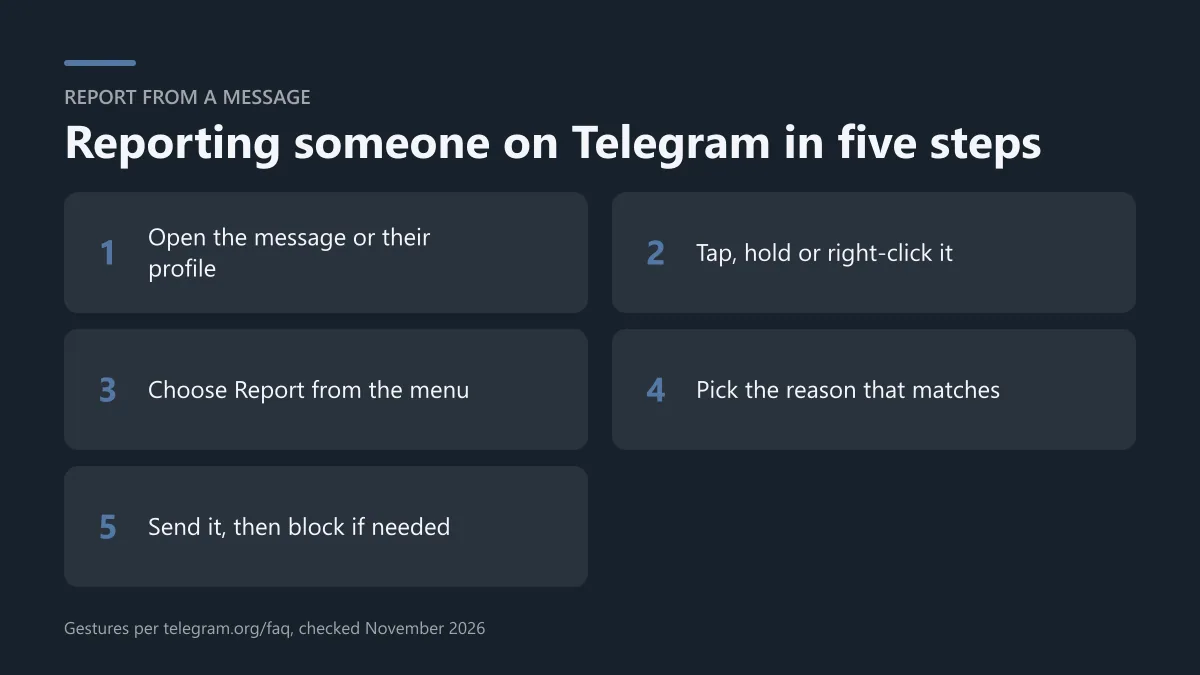
Only the gesture changes between apps. Telegram's official FAQ names three, as of November 2026. Android uses a tap on the message. iPhone and iPad use a press and hold. A right-click works on Desktop, Web and macOS. After that, every app shows the same Telegram report user screen with a reason list.
How to report someone on Telegram Android phones use
- Open the chat with the person.
- Tap the message that breaks the rules.
- Choose Report.
- Pick the reason that fits what they sent.
- Add a short note if the screen offers one, then send.
iPhone steps for how to report a user on Telegram
Press and hold the message until the menu appears. Tap Report, choose a reason and send. To flag the whole profile, open it and find Report in its menu. Opening the profile, not a message, is how to report a Telegram account as a whole. Knowing how to report Telegram account behavior from the profile also helps once the messages are gone.
How to report account in Telegram on a computer
In Desktop, Web or the macOS app, right-click the message. Select Report, then a reason, then send. The layout differs a little, but the order stays the same. This is how to report Telegram user accounts from a work laptop too.
Why include messages? Telegram's public API shows two kinds of report. The message report method rejects a report that lists no message IDs. The profile report method flags a whole user or chat with a reason and a comment, but no messages. Telegram does not say which one each button calls. So how do you report someone on Telegram in a way that holds up? Attach the messages, so the moderator has something concrete to judge. The same habit helps when a member spams a whole group, as the steps for reporting a whole Telegram group explain.
How do I report a scammer, an impersonator or a bot on Telegram?
Use Report in the app first, then add the one extra route that matches the harm, such as @NoToScam, an email or the police.
| How to report account on Telegram, by harm | Telegram how to report user, in the app | Add this route |
|---|---|---|
| Report user on Telegram for spam DMs | The spam messages | Block after the report is sent |
| Report user Telegram admins have not removed | Their messages in the group | Ask an admin to report them too |
| Scam that cost you money | The messages and the profile | abuse@telegram.org with links, plus the police |
| Someone posing as you | The fake profile | @NoToScam with both profile links |
| Phishing bot | The bot and its messages | abuse@telegram.org with the bot's handle |
| Your work reposted | The post or channel | dmca@telegram.org from the rights holder |
Two bots cause mix-ups. @NoToScam is only for a scammer who poses as you, according to Telegram's FAQ. @SpamBot files no reports at all. It is the appeal desk for accounts that were limited. Admins wondering how to report someone in Telegram groups have their own tool. Under the spam FAQ, they may flag members who spam.
For example, in a hypothetical case, a fake help account copies the logo of a store at example.com. It writes to the store's buyers and asks for a "refund fee." The owner reports the fake profile in the app and sends both profile links to @NoToScam. Buyers who paid also go to the police. Money cases have their own order of steps, set out in where to file a Telegram fraud report first. A reposted video or song follows the Telegram DMCA takedown route instead.
What should you save before you report or block?
Keep the @username, its t.me address, screenshots with dates and any payment receipts before anything else, since the other person can wipe the chat.
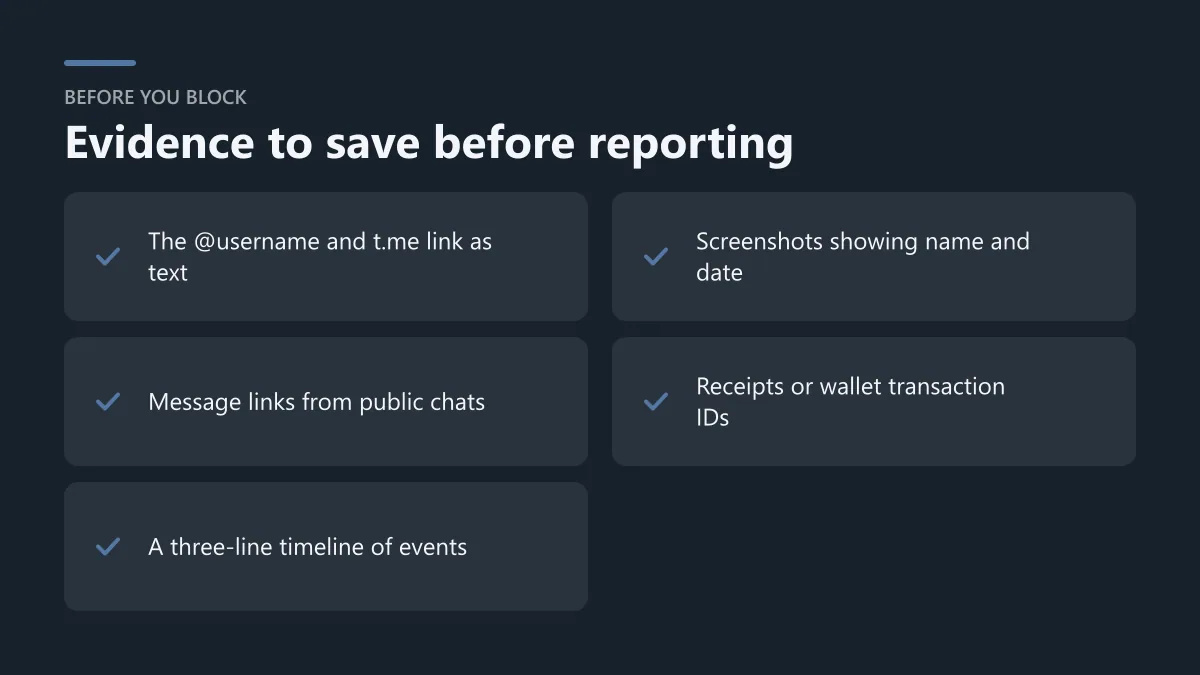
Deleted messages are the trap. Telegram's FAQ lets either person in a private chat delete messages for both sides. No trace is left behind. So the sender can wipe the proof before your report lands. File the report while the messages are still on screen, and block only after that.
A block on their side does not stop you. If their profile still opens through a saved link or a username search, use Report from its menu. If the chat is gone, email abuse@telegram.org. Telegram asks for links in every emailed complaint, so a t.me address matters more than a long story.
Why a Telegram report goes nowhere
- The screenshot cuts off the username.
- The reason chosen does not match the content.
- The only lead is a phone number, which no report method accepts.
- The group is private and you never joined it. The profile report method then returns CHANNEL_PRIVATE.
Scammers rename often to dodge this. The notes on tracing Telegram scammers who change names show which details stay fixed. Can you report a Telegram account you can't open at all? Not through the app. Reporting Telegram account holders who hide behind a number needs a handle or a link first.
What happens if you report someone on Telegram?
A moderator reviews the report, and a confirmed breach brings a temporary limit, according to Telegram's spam FAQ.
A first limit is expected to end after a few days. Repeat offenses bring longer ones. A person who keeps pestering strangers can lose the right to contact them for good. While limited, the account can still answer people who message it first. Contacts who saved its number can still hear from it too.
How many reports get a Telegram account banned?
Telegram publishes no number. It also publishes no review deadline. Ten copies of the same report add no new proof, which is why a mass report bot pitch fails against the rulebook. The guide on how many reports ban a channel reaches the same answer. A clear breach is what counts, as the list of real reasons Telegram bans an account shows.
The volume is still large. Telegram's moderation stats page showed a 2026 tally of 30,632,909 blocked channels and groups when checked on 20 November 2026. Of those, 499,252 involved child abuse material. Another 200,415 were terrorist groups. The page says user reports and machine learning have worked together since 2015.
Does Telegram send reports to the police?
No Telegram page says reports are forwarded to police. Its privacy policy covers a narrower case in section 8.3. If a valid order from judicial authorities names someone as a criminal suspect, the policy allows Telegram to disclose that person's IP and phone details after a legal review. Such cases go into a quarterly transparency report. If you lost money, go to the police yourself. U.S. victims can also file with the FBI's IC3 complaint portal. A ban closes an account, but it never returns funds.
If you report someone on Telegram will they know?
They may notice a limit or a label, but Telegram's published pages never say the reporter's name is shown to them.
| Sign on their side | What it means |
|---|---|
| Can't message strangers | Moderators limited the account for a while |
| Account frozen, appeal button shown | Reports led to a restriction |
| Fake label next to the name | Many users flagged it as fake or scam |
| Nothing changes | No breach was found, or no limit applied |
The limits come from the spam FAQ and the main FAQ. The label is a flag on Telegram's user object, set when many users report an account as fake or scam. None of these signs names the person who filed. Still, context can give you away. In a private chat, you may be the only one who saw the message. An emailed report also shows your address to Telegram's team. Crop your own name out of any screenshot.
The EU path works differently. Telegram's EU notice form asks for a name and contact details. The Digital Services Act requires both in a formal notice. Article 17 lets a platform name the notifier when that is strictly needed. An in-app report is a separate path. The guide on whether a message report stays private covers that split in depth.
How to remove Telegram report limits on your own account
A report you sent can't be withdrawn, but a limit on your own account can be appealed through @SpamBot or the in-app appeal.
No Telegram page lists an undo step for a filed report. The other half of the question has a clear path, based on the FAQ and the spam FAQ:
- Check your state. A limited account can still reply. A frozen one can read its chats but can't send.
- If limited, open @SpamBot and explain why the limit is a mistake.
- If frozen, use the appeal button in the app. Moderators review it and lift a wrong restriction.
- Wait out the rest. The spam FAQ turns down every request for early release.
Frozen accounts have their own guide on getting a frozen Telegram account back. If a stranger took over your account and spammed from it, start with recovering a hacked Telegram account.
Telegram Ban Service declines some requests every time. Those include reports against people who follow the rules, mass or coordinated reporting, report bots, false impersonation claims and anything that needs your login code. The same mass-report offers turn up for other apps, as seen with WhatsApp mass report bot sellers on Telegram and what Instagram mass report buyers get. The honest scope for WhatsApp is in the WhatsApp ban service guide.
Abuse can spread to other apps. A repost on Facebook falls under Meta's rules, explained in Facebook post removal through official routes. A fake review has its own process, covered in how to request removal of someone else's review and the playbook for fixing negative reviews. When one Telegram account needs more than a single report, Telegram Ban Service handles the account takedown case through the same official routes.
FAQ
Can you report a Telegram account that blocked you?
Yes, if the profile still opens for you. A block only stops them from writing to you. The account itself stays up. Search the @username or open a t.me link you saved earlier. If the profile loads, open its menu and choose Report. An account with no username is harder. With no handle and no link, there is nothing for you or a moderator to open. In that case, email abuse@telegram.org with every link you kept and dated screenshots that show the name. Telegram wants links in emailed complaints, because the moderator starts there. After a block, how to report a user on Telegram comes down to what you saved first. Copy the link, report Telegram account abuse while the chat is visible, and block last. That order keeps every option open. It takes about a minute and costs nothing.
Should you report user on Telegram before you block them?
Yes, report first and block second. A block does not cancel a report, but it can cost you proof. Either person in a private chat can delete messages for both sides. Telegram's FAQ says such deletions leave no trace. If the sender wipes the chat after your block, the evidence is gone. So take screenshots, copy the t.me link and send the report while the messages show. The gesture depends on the device. Guides on how to report someone on Telegram Android phones describe a tap on the message, which matches Telegram's FAQ. iPhones use a press and hold. Computers use a right-click. The Telegram report user screen then asks for a reason. Pick the one that fits, include the worst messages and send. Block after that. The report stays with the moderators, and the block keeps new messages out.
Can a report user Telegram bot file reports for you?
No official bot reports other people. Two Telegram bots get confused here. @SpamBot handles appeals from accounts that were limited. @NoToScam covers one case: a scammer posing as you. Neither one takes a general complaint. Paid report bots sold in channels are something else. They promise piles of reports, but copies add no proof for a moderator to weigh. They also break Telegram's rules on spam. How to report Telegram user accounts properly is simple: use Report in the app and include the messages. The same method covers how to report a Telegram account, a channel or a bot. Without a bot, how do you report someone on Telegram? Open the message or the profile, choose Report, select the reason that matches and send. A moderator then reads what you sent and decides. Nothing about a bot makes that review faster.
How to report account on Telegram with only a phone number?
You can't report a bare phone number. Telegram's report methods point at a chat, a profile or messages, and a number is none of those. Can you report someone on Telegram you only know by number? Only after you reach their profile in the app. If the number is in your contacts and the person uses Telegram, their profile may open from your contact list. Report it from there as normal. If nothing opens, look for anything else that names the account. An old screenshot may show a username. A group they posted in may hold a link. That is the catch in how to report Telegram account holders known only by number: email fails too, since the moderator needs a link to open. If money was lost, give the number to the police and your bank. They have legal powers that a platform report does not.
How to report on Telegram from a browser without the app?
Telegram Web has the same Report option as the desktop app. Telegram's FAQ groups Desktop, Web and macOS together. The steps for how to report account in Telegram Web match the desktop app: right-click, then select Report and a reason. Telegram how to report user steps barely change between apps, since only the gesture differs. You still need to sign in, because every report comes from an account. Have no account, or prefer not to use yours? Email abuse@telegram.org instead. Add t.me links and dated screenshots, since an email has no chat for the moderator to open. A browser helps on a work laptop or a shared computer. Sign out when you finish. Channels, groups and bots get reported the same way. The steps also work for a profile that reached you through a group invite link. The menu wording may shift slightly between versions, but Report stays in it.
If you report someone on Telegram will they know your name?
Telegram's pages never say the reporter is named. The FAQ and the spam FAQ describe what happens to the reported account, like a limit or a freeze. Neither one mentions sharing who filed. The person may still see the result. A limit, a freeze or a fake label tells them that reports came in. Whether they can guess who sent one depends on the setting. In a busy group, many people saw the same post. In a private chat, you may be the only one, so they could work it out. An email report shows your address to Telegram, but not to the account. EU law adds a twist. A formal notice under the Digital Services Act needs your name and email. The law lets a platform name the notifier only when strictly needed. To stay quiet, use the in-app button and crop your name from screenshots.
How to remove Telegram report limits after people flagged you?
Start by checking which state the account is in. A limited account can still reply to people who write first. It can also message anyone who saved its number. A frozen account keeps its chats but can't send anything new. For a limit, open @SpamBot and explain why the limit is wrong. For a freeze, use the appeal button in the app, and a moderator will review it. Telegram's FAQ says a mistaken freeze is lifted. The spam FAQ expects a first limit to end in a few days. Later limits last longer. Asking for early release does not work, because Telegram refuses that request outright. A report you filed against someone else can't be undone either. Once sent, it stays with the moderators. Unblocking the person only changes what you see. It does not pull back what was filed.
How to report someone in Telegram groups if you're the admin?
Admins can report members from inside the group. Under Telegram's spam FAQ, admins of a group may flag members who spam, and human moderators review those flags. Open the member's message, use the message menu and choose Report, the same way any user would. Then remove the member with your admin tools, so the spam stops while the review runs. Reporting Telegram account spam from the admin seat uses that same menu. Keep one copy of the worst messages before you delete them, in case you need to email abuse@telegram.org later. A group can also use slow mode or join approval to stop a repeat. Those settings stop the next wave without anyone filing a report. Ordinary members who see spam can still report it themselves. A report from several real members about the same post gives the moderator more context. It does not work like a vote, though. The rule breach is what the moderator weighs.